Practice management designed for the way therapy is really practiced.
Keep individual, couple, family, and group therapy connected across participants, appointments, attendance, documentation, communication, billing, payments, and follow-up.
Free for 30 days with up to 10 active clients, no credit card required. Professional is $39/month.
Cases for individuals, couples, families, and therapy groups
No shared AI training on client information
Cards, portal express payments, and lower-cost bank transfers
Google Calendar sync included
Guided migration support
Session Workspace
Appointment context, session preparation, source material, and note work stay close together.
Artwork: Rachel Kaye
Prepare, meet, document, follow up
A practice system designed around clinical work
PracticeRunner is designed for the way therapy is really practiced, without asking therapists to surrender control of their clinical workflow, client information, or business model to a large platform.
Free practice website review
Is your website making it easy for prospective clients to take the next step?
Review your website's clarity, local visibility, trust signals, and contact or booking paths. No email is required to start. See your scores and one-hour plan, then choose whether to receive the complete PDF and subscribe to occasional emails about practice management and PracticeRunner updates.
Practices that do not fit a one-client, one-chart assumption
PracticeRunner keeps the daily practice-management workflow familiar while adapting the case structure, language, responsibilities, and documentation to the work being done.
Relationship cases
Couples, families, and therapy groups
Keep the relationship or group connected across participants, attendance, documentation, portal access, communication, billing, and payments.
Schedule, document, invoice, accept portal payments, and communicate securely without presenting consultation clients or workshop participants as psychotherapy clients.
Coordinate clinicians, associates, supervisors, and administrative staff across mixed case types, flexible billing, note review, and practice-wide reporting.
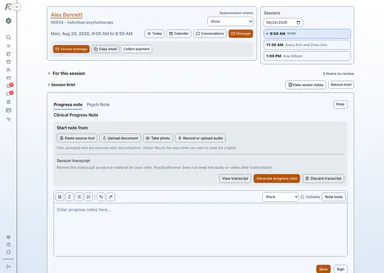
Review recent notes, prepare for the session, and write your next note.
The Session Workspace is an appointment-specific page for preparation, relevant case context, appointment materials, source material, optional recording or transcription when enabled, documentation, and follow-up visibility. Billing and payments remain part of the broader PracticeRunner system rather than actions completed from the workspace.
Appointment details, status, contact actions, and same-day session navigation
Relevant client or case context without turning preparation into a full chart review
Appointment materials, notes, source material, optional Session Brief, and draft review in the appointment workflow
Optional audio recording or audio/video upload, consent confirmation, transcript review, and clinician-controlled note drafting when enabled
Follow-up visibility through tasks, attention items, and connected client or case workflows
Record appointment audio or upload audio or video for transcription when the practice enables those tools and consent has been confirmed.
Documentation
Review source material and work with editable draft notes before saving or signing documentation.
Optional AI Assistant
Prepare for sessions and turn source material into a draft, with the clinician in control.
AI Assistant brings together Session Brief, recording and transcription, drafting from source material, and note revision. Writing and appointment-preparation tools are included with all plans. Recording and transcription are included during PracticeRunner's early stage, with no separate transcription charge today. PracticeRunner will explain any future allowance or charge before it applies. Every tool is disabled by default, and therapists review the resulting material before it becomes clinical documentation.
No stored recordings
Audio and video are deleted after transcription. PracticeRunner does not keep them as session recordings.
No shared AI training
Client information is not used to improve AI for other practices or to build shared AI models.
Optional and therapist-controlled
AI Assistant starts disabled. The practice chooses which features to enable and can turn them off at the practice level. The therapist decides when to use an enabled feature and reviews every draft.
When enabled, processing runs under PracticeRunner's HIPAA and BAA safeguards. You decide whether to retain or discard the resulting transcript. PracticeRunner may offer optional practice-specific AI personalization in the future. Any such feature would remain isolated to the practice and under its control.
Keep the relationship or service together, even when it is not individual therapy.
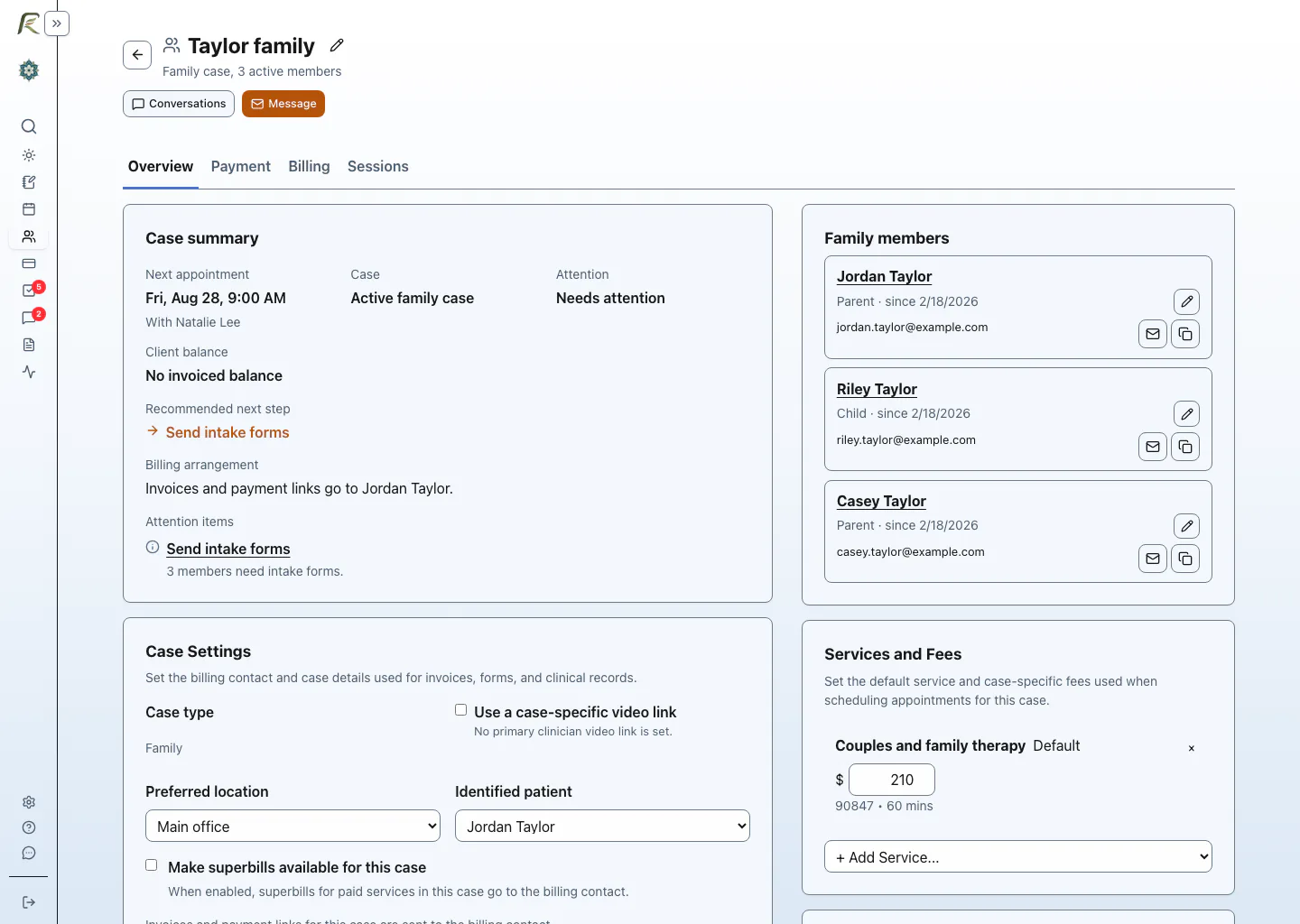
A case remains the organizing structure over time, not just for one appointment. Families and therapy groups keep their participants and shared history together. Consultation clients, consultation groups, and workshop groups get the full scheduling, workspace, portal, communication, and billing experience without being treated as psychotherapy clients.
Family and therapy-group cases retain a member roster, appointments, attendance, notes, communication, and billing across sessions.
Individual consultation and consultation groups use Session Workspace, consultation notes, invoices, portal payments, receipts, forms, and secure communication without diagnoses, superbills, or artificial CPT codes.
Workshop and skills groups keep participants, registration materials, attendance, Session Workspace, secure messages, invoices, portal payments, receipts, and group notes together without presenting the service as psychotherapy.
Couple cases stay shared, while client-specific note addenda keep sensitive information with the appropriate participant.
Supervisors and associates get dedicated roles, review workflows, and delegated access.
More of what your practice earns should stay with your practice.
PracticeRunner is for therapists who want capable software and expect the economics to make sense. Plans stay straightforward, useful capabilities are included within the product, and lower-cost payment methods are priced according to their lower processing cost.
Use lightweight AI writing and preparation tools as part of your plan.
Reduce payment-processing costs with bank transfers priced at approximately 1%, capped at $8.
Starter is free for 30 days, Professional is $39/month, and Group is $59/month, published up front.
Improve collection reliability through clear invoices, AutoPay, reminders, and manual payment tracking.
Open by design
PracticeRunner fits into your practice. It does not fence it in.
Your calendar, video service, source material, and records should not become reasons you are trapped inside one company's ecosystem. PracticeRunner gives you practical ways to work with tools you already use, bring information in, and take your records with you.
Use direct Google Calendar sync or private calendar feeds with compatible calendar applications.
Choose Zoom, Google Meet, Microsoft Teams, or another video link for sessions.
Start note work from outside transcripts, pasted text, supported documents and images, handwritten material, audio, or video.
Export migration-friendly CSV files, note text, PDFs, and original uploaded files, or create a complete PracticeRunner backup.
Step away on parental leave, a sabbatical, or another extended pause with read-only Archive for $8 per month.
Moving from SimplePractice
Changing systems does not have to mean starting over.
Upload your SimplePractice export directly in PracticeRunner. The guided importer brings over supported client information, notes, billing documents, forms, and historical records, then keeps the result reviewable before you rely on it.
The same import process helped move the founder's own clinical practice.
Because SimplePractice does not export calendar data, the importer reconstructs historical appointments from dated records when possible. You set up the current and future recurring schedule you want to use going forward.
Complete practice management
More than a session page
The Session Workspace sits inside a broader practice-management system for scheduling, documentation, billing, forms, secure communication, and case-aware workflows. Most therapists did not enter the field to spend their day managing payment rules, scheduling systems, software add-ons, and administrative follow-up, so PracticeRunner brings integrated Stripe payments, lower-cost bank transfers, configurable payment-method discounts, Google Calendar sync, and clinician-controlled AI assistance into one connected system.
Today
Start with today's sessions, then review the practice items that need attention first.
Tasks
Move into the full task list when you need filters, workflow detail, or a broader follow-up view.
Scheduling and calendar
Appointments, ongoing series kept scheduled ahead when enabled, availability, appointment requests, rebooking, rescheduling, cancellation requests, calendar feeds, and Google Calendar sync.
Invoices, statements, superbills, reviewed CMS-1500 claim PDFs, online card payments, portal Apple Pay and Google Pay when eligible, pay-by-phone handoff, lower-cost bank transfers, AutoPay, and outside payment tracking.
Individuals, couples, families, therapy groups, consultation clients, consultation groups, and workshop groups can each have a case with the workflow and language appropriate to the work.
PracticeRunner was founded by Bruce Hearn, a practicing therapist and software engineer. It is shaped by clinical experience and by the practical routines therapists handle every week: sessions, documentation, billing, client communication, forms, supervision, and follow-up.
PracticeRunner is designed for therapy practices and includes security and privacy safeguards for clinical, billing, portal, and communication workflows.
Staff can use passkeys, one-time email links, or enabled Google or Microsoft sign-in. Owners can require passkeys or physical security keys for privileged accounts or the whole team.
Audio and video are deleted after transcription. You decide whether to retain or discard the resulting transcript.
Recording, transcription, drafting, review, and final documentation remain under the therapist's control.
When enabled, these tools run under PracticeRunner's HIPAA and BAA safeguards.
PracticeRunner is available now. Get hands-on onboarding, direct founder support, and an opportunity to share feedback as the product continues to develop.