
How PracticeRunner Uses AI Without Training Shared Models on Client Information
How optional AI-assisted features work in PracticeRunner, why media, scans, and photos are deleted after transcription or text extraction, and how PracticeRunner keeps client information out of shared and cross-practice AI training.
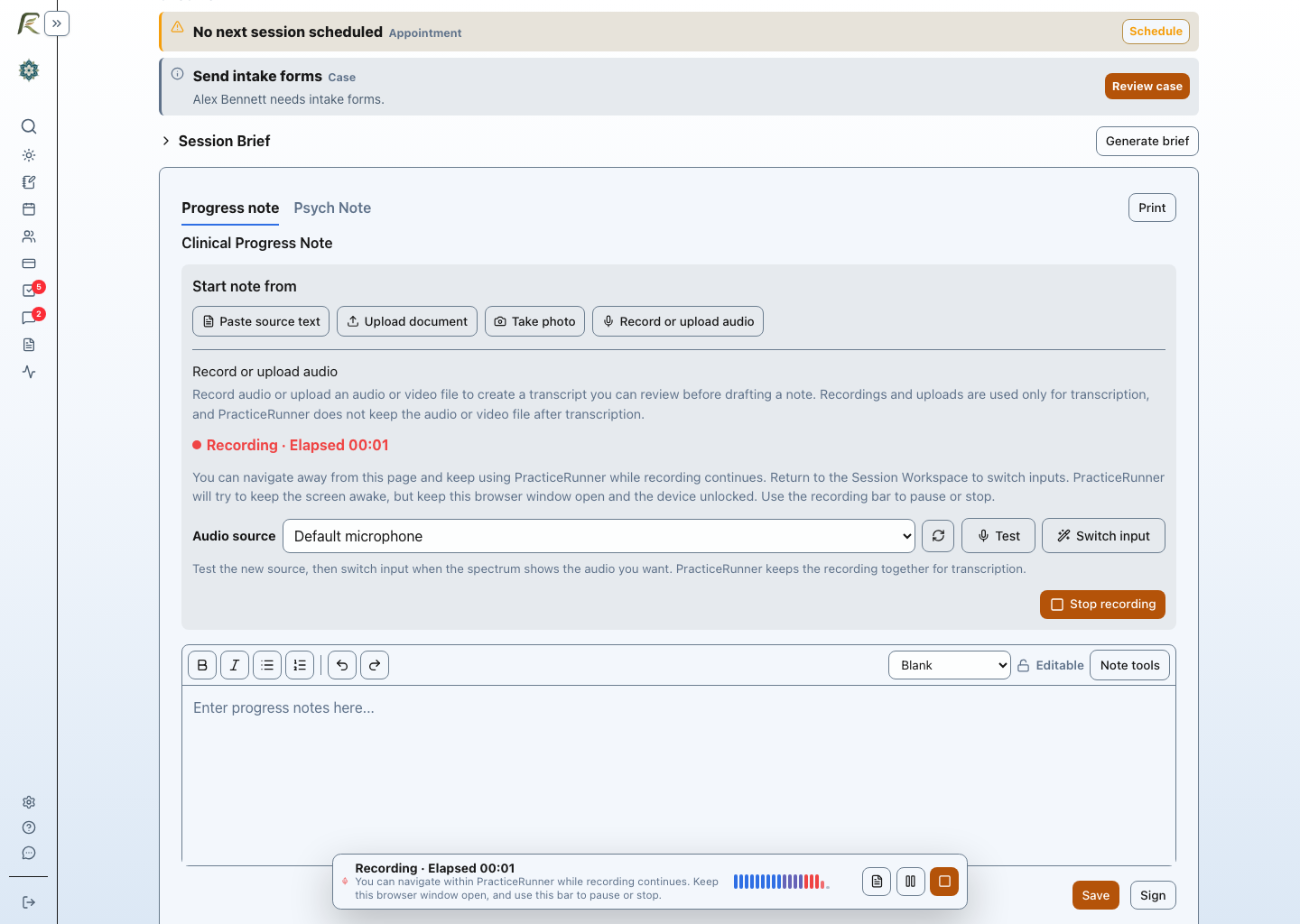
AI-assisted features in PracticeRunner are optional. They are disabled by default, and a practice can leave them disabled or turn them off at the practice level. If a therapist chooses transcription, PracticeRunner deletes the audio or video afterward. Client information is not used to train shared AI models or improve AI for other practices.
When a therapist chooses to use recording, transcription, or AI-assisted drafting, therapy sessions can contain details that clients have shared with very few people. A recording or full transcript may contain substantially more information than belongs in the final clinical note.
PracticeRunner therefore treats recording, transcription, and AI-assisted drafting as optional tools for creating clinician-reviewed documentation. Recordings are temporary, and information from one practice is not used to improve AI for another practice.
Our commitments are straightforward:
- audio and video are deleted after transcription
- a temporary scan or photo uploaded for text extraction is deleted after successful extraction, with cleanup and retry handling for unfinished uploads
- client information is not used to train shared AI models
- one practice’s information is not used to improve AI for another practice
- all AI-assisted features are disabled by default and can be turned off at the practice level
- the therapist decides when to use the tools, what to retain, and what belongs in the final note
- enabled processing runs under PracticeRunner’s HIPAA and BAA safeguards
- practice-specific AI personalization is not currently offered; if introduced, it would be optional, isolated to the practice, and under the practice’s control
Why PracticeRunner does not keep audio or video
PracticeRunner needs recorded or uploaded media only long enough to create the requested transcript. After transcription, PracticeRunner deletes the audio or video instead of keeping it as a session recording.
Keeping the original media would create an additional store of highly sensitive information without improving the therapist’s final documentation. Deleting it reduces the amount of session material that remains after the requested task is complete.
This applies to audio recorded in PracticeRunner and audio or video uploaded to PracticeRunner for transcription. For video uploads, PracticeRunner uses the audio track for transcription and does not analyze the visual content.
If the media came from another recorder, telehealth service, phone, computer, or storage account, the practice must manage that external copy separately. PracticeRunner cannot delete a file held outside PracticeRunner.
Temporary extraction uploads and saved attachments
The same approach applies to a scan or photo used to extract text for a note draft, including a photo of a handwritten paper note taken with a phone or computer camera. PracticeRunner needs the image only long enough to extract its text. Files uploaded specifically for extraction are temporary and are deleted after successful extraction. Unfinished or failed uploads become eligible for cleanup after 24 hours, and failed deletions are retried. This is a cleanup threshold, not a guarantee that deletion finishes at exactly 24 hours. Files saved as ordinary record attachments remain retained, even if they are later used for drafting. The extracted text can remain with the appointment as source material, the same way a transcript can, so the therapist can review and use it when preparing documentation.
What happens to the transcript
The transcript is different from the original audio or video. After transcription, it can remain with the appointment as source material so the therapist can review it and use it when preparing documentation.
Transcripts are temporary: they are cleared at final note signing or become eligible for nightly cleanup 30 days after creation, whichever comes first. This includes existing transcripts. Choose Discard transcript to remove one earlier. See AI privacy and data use for the full retention explanation.
This distinction matters:
- PracticeRunner automatically deletes the audio or video after transcription.
- PracticeRunner keeps the resulting transcript temporarily for review until manual discard, final signing or age-based cleanup.
- The final note is not created, saved, or signed without clinician review and action.
How client information is used for AI-assisted features
PracticeRunner does not use client recordings, uploaded media, transcripts, notes, or other client information to train shared AI models or improve AI for other customers.
Today, client information is processed only to provide the feature the therapist requested. A therapist requesting transcription, Session Brief, draft assistance, or note revision is asking PracticeRunner to help with that appointment, not contributing the session to a cross-practice dataset.
This commitment applies even if information could be described as de-identified. PracticeRunner does not rely on de-identifying therapy transcripts as a reason to retain them for shared or cross-practice AI training.
PracticeRunner may offer optional practice-specific AI personalization in the future, such as preferred vocabulary, formatting, or documentation preferences. Practice-specific AI personalization is not currently offered. If introduced, it would be clearly disclosed, isolated to the practice, under the practice’s control, and would not improve AI for other practices without explicit permission.
AI-assisted features are optional
PracticeRunner is practice management software, not a system that requires AI-assisted documentation.
All AI-assisted features are disabled by default. The practice decides whether to enable them and can turn them off at the practice level. Recording, media upload, transcription, Session Brief, transcript-based drafting, and note revision tools remain unavailable unless the practice enables the relevant feature.
AI-assisted features are not required for documentation. A therapist can write, review, save, and sign notes without using them. Even when the practice enables an AI-assisted feature, the individual therapist decides whether to use it in a supported workflow.
When the tools are enabled, the therapist still chooses:
- whether recording or transcription is appropriate for the session
- whether required consent has been obtained
- when to record or upload media
- whether to request an AI-assisted draft
- whether to discard the transcript before automatic cleanup
- what to correct, remove, or add
- whether the final note is ready to save or sign
Automation can reduce drafting friction. It does not replace clinical judgment or transfer responsibility for the note away from the therapist.
HIPAA and BAA safeguards
When a practice enables supported transcription and AI-assisted features, processing runs under PracticeRunner’s HIPAA and BAA safeguards. Client information is handled within the safeguards and contractual framework PracticeRunner uses for protected health information.
Technical safeguards do not replace the practice’s responsibilities. Practices should still decide when recording is appropriate, obtain any consent required by law or professional rules, control access to transcripts and notes, and manage copies created outside PracticeRunner.
The practical summary
PracticeRunner uses session media, scans, and photos for the task the therapist requested, deletes temporary media after transcription or successful text extraction, with cleanup for unfinished extraction uploads, and does not use client information to train shared AI models or improve AI for other practices. The resulting transcript or extracted text can be reviewed until it is discarded or cleared under the temporary-source retention policy. All AI-assisted features start disabled, and the practice can keep them disabled or turn them off at the practice level. Practice-specific AI personalization is not currently offered.
For operating instructions, see Session Workspace and Record Audio. For documentation workflow guidance, see Notes and Source Material.