
SimplePractice is a mature, broad practice-management platform. PracticeRunner is a newer alternative designed around the session and the full clinical or professional relationship. The better choice depends less on which product has the longest feature list and more on how your practice actually works.
Choose SimplePractice when
Established breadth and insurance automation are essential
SimplePractice is likely the stronger fit if you need integrated electronic claims, eligibility checks, automated ERA posting, native mobile apps, Tap to Pay, or live AI assistance inside the platform's own telehealth experience. That breadth comes with a higher standard starting price and a more limited ability to configure payment options.
Consider PracticeRunner when
You want more control over cases, sessions, and financial policy
PracticeRunner may fit better if you want stronger control over private-pay billing, a case and Session Workspace that flags unpaid invoices and incomplete forms automatically, or the flexibility to bring your own video platform instead of a single built-in option. Bank transfers cost approximately 1%, capped at $8. SimplePractice applies its standard 3.15% + $0.30 fee to Link bank payments. PracticeRunner also includes dedicated case types for consultation and workshops.
The short answer
SimplePractice has had more time to build a wide platform and an established customer ecosystem. Its strengths are especially clear for insurance-based practices. On qualifying plans, it combines electronic claims, eligibility, and ERA automation with scheduling, telehealth, billing, documentation, mobile apps, and client-facing tools.
PracticeRunner is available for real practice use, but it is still early stage and improving quickly. Its strongest differences are structural. It uses one shared-case model across couples, families, therapy groups, and professional consultation relationships, and places appointment preparation, context, documentation, and optional AI tools in a Session Workspace. Case and Session Workspace pages also surface attention items automatically, such as an unpaid invoice, a payment method that needs updating, or a form left incomplete, instead of requiring a clinician to check billing, forms, and notes separately. It also gives the practice more direct control over financial policy through case-level payment methods, automatic payment-method discounts, lower-cost bank transfers, and advance billing. New practices can receive direct founder support, guided onboarding, and review of imported SimplePractice records.
The standard price difference is concrete. PracticeRunner Starter is free for 30 days with up to 10 active clients and no credit card required; Professional is $39 per month. SimplePractice starts at $49 per month, with Essential at $79 and Plus at $99, before optional AI add-ons. For a private-pay practice, subscription price is only part of the difference because SimplePractice applies its standard integrated-payment fee to cards and Link bank payments, while PracticeRunner's bank-transfer rate is approximately 1%, capped at $8.
Two different kinds of company
SimplePractice is one of EngageSmart's software products. EngageSmart was acquired by an affiliate of Vista Equity Partners in January 2024 in a transaction valued at approximately $4 billion, with General Atlantic continuing as an investor. Like other institutionally owned companies, EngageSmart answers to owners who expect financial returns. That scale can also bring substantial resources, an established organization, and the breadth of a mature platform.
Ownership does not prove why any particular price or product decision exists. The visible economics still matter: SimplePractice's current model layers base-plan pricing with per-clinician charges, optional AI subscriptions, and payment fees, billing each added clinician at the same per-seat rate whether they are fully licensed or an associate who typically earns considerably less. PracticeRunner instead prices an associate seat at $11 per month, well under the $29 per month cost of an additional full clinician seat on its Group plan. At the same time, leaving an established EHR requires moving and reviewing records, rebuilding workflows, and managing real operational risk.
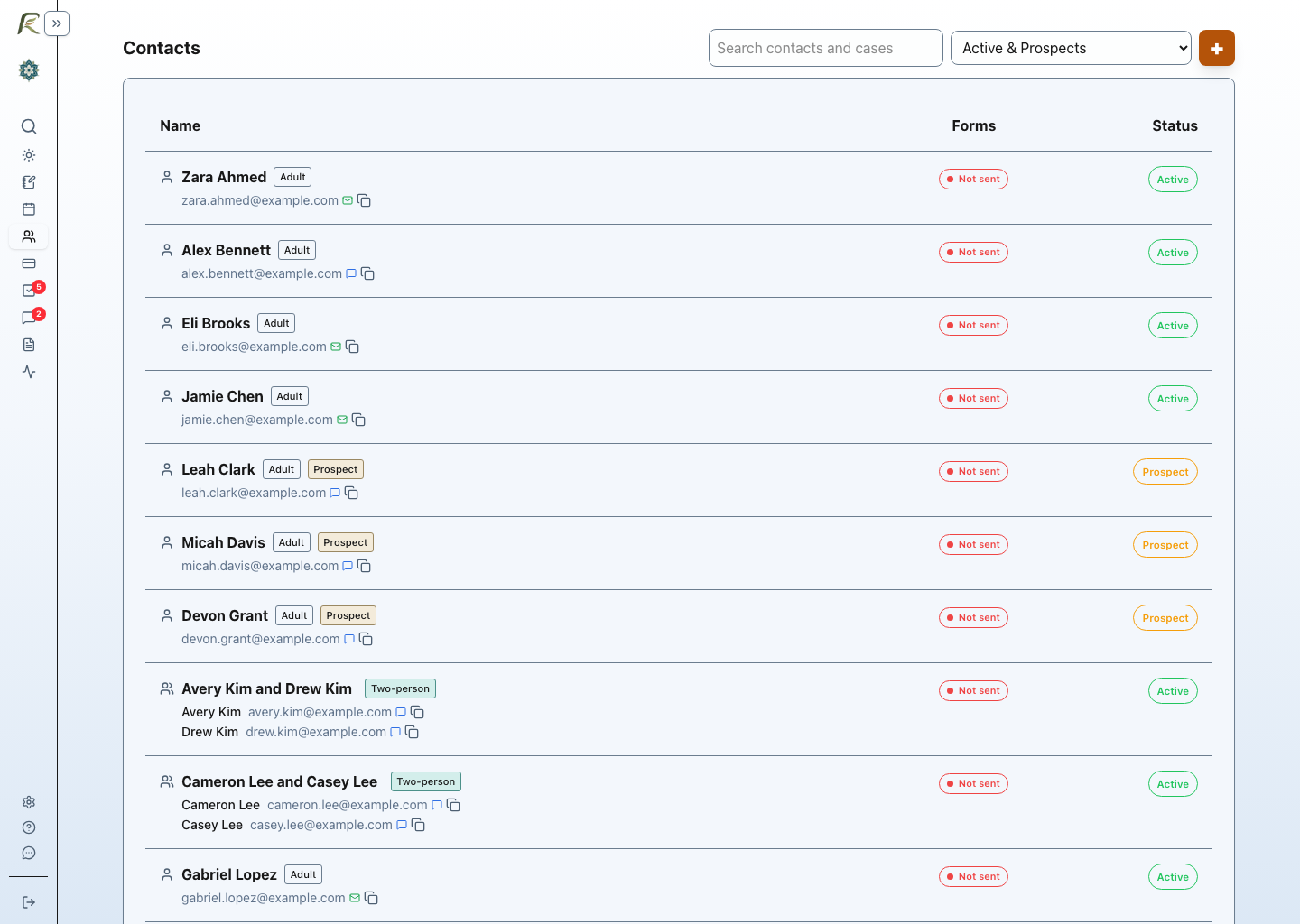
PracticeRunner was created partly in response to that imbalance. It is a much smaller, founder-led company created by a practicing therapist. Founder Bruce Hearn, LMFT remains directly involved in product development, demonstrations, onboarding, support, and conversations with therapists. If you value knowing who is responsible for the software and want your subscription to support a small, therapist-created practice-management business, that may be a meaningful distinction.
The difficulty of changing EHRs should not become a pricing strategy. Practice software should earn continued business by providing value, charging fairly, and giving therapists meaningful ways to take their records elsewhere. That principle is why PracticeRunner invested in a guided SimplePractice importer rather than leaving each therapist to rebuild a practice by hand. The tradeoff remains real: SimplePractice offers the resources and breadth of a much larger organization. PracticeRunner offers closer accountability and direct access, while remaining a newer product with a smaller team.
AI packaging at a glance
PracticeRunner includes AI tools during its early stage, with no separate transcription charge today.
SimplePractice offers Note Taker and Care Aide as subscriptions added to its practice-management plans. PracticeRunner currently includes note revision, drafting from source material, attachments, Session Brief, recording, and transcription with all plans. PracticeRunner will explain any future allowance or charge before it applies.
| Scenario | SimplePractice standard price | PracticeRunner standard price |
|---|---|---|
| One clinician with recording and AI note drafting | Starter plus Note Taker: $84/month or $1,008/year | Professional with included recording and AI drafting: $39/month or $468/year |
| Two clinicians with recording and AI note drafting | Plus $99 + $74 additional clinician + $70 Note Taker: $243/month or $2,916/year | Group with two clinician seats and included AI tools: $59/month or $708/year |
| Two clinicians with the broader Care Aide suite | Plus $99 + $74 additional clinician + $108 Care Aide: $281/month or $3,372/year | Group: $59/month or $708/year; includes treatment-plan assistance but does not offer live replay or in-session recap |
The training-data stance deserves a fair comparison
Both companies publish no-model-training commitments. Their separate policies on retaining transcripts for product improvement differ, as explained below.
Standard prices were checked on September 7, 2026 against SimplePractice pricing and its team-pricing guide. Note Taker already includes recording and transcription; Care Aide adds broader tools. Temporary promotions are excluded. The suites differ in features and are not interchangeable.
Comparison at a glance
| Area | SimplePractice | PracticeRunner |
|---|---|---|
| Product maturity | A mature, widely used platform with an established ecosystem | A newer, early-stage platform with direct founder support |
| Company structure | A product of EngageSmart, acquired by Vista Equity Partners in 2024 with General Atlantic continuing as an investor | A small, founder-led company created by a practicing therapist |
| Couples | A shared couple profile for appointments, documentation, billing, portal access, and messaging, with separate individual profiles when needed | A shared couple case with shared session notes, plus optional client-specific addenda kept in that person's own record |
| Families and therapy groups | Group appointments linked to individual profiles, with attendance, individual billing, a group note, and participant-specific notes | Family and therapy-group cases in their own right, with a member roster, shared appointments, notes, billing, and communication |
| Consultation | No equivalent first-class consultation case was found in published materials | Individual consultation and consultation groups with consultation-specific notes and workflows |
| Workshop and skills groups | No distinct nonclinical workshop case was found; group appointments remain connected to client profiles | A nonclinical workshop-group case with participants, attendance, forms and materials, billing, communication, and group notes |
| Session workflow | Clinical and administrative features across the wider platform | An appointment-specific Session Workspace for preparation, context, notes, source material, and optional AI tools |
| AI assistance and standard pricing | Note Taker is a $35 monthly add-on per clinician; Care Aide is $59 monthly for the account owner plus $49 for each additional clinician | AI writing, preparation, recording, and transcription are included during PracticeRunner's early stage, with no separate transcription charge today |
| Associate seat pricing | Additional clinicians require Plus: $74/month each for practices with 2–5 clinicians, with lower published rates for larger groups; no separate associate rate is listed | An associate seat is $11/month, well under the $29/month cost of an additional full clinician seat on Group |
| AI training and control | Says it does not train underlying AI models with transcripts; offers optional de-identified transcript retention for product improvement, with controls at clinician, client, and session levels | Client information is not used to train shared models or improve AI for other practices; optional AI is off by default, and transcripts can remain until discarded |
| Insurance | Electronic claims, eligibility, and ERA automation on qualifying plans | Superbills, reviewed CMS-1500 PDFs, and manual payer-response reconciliation, without electronic submission or automated ERA posting |
| Calendar sync | Two-way Google and Outlook sync on qualifying plans, with plan-specific limits; Apple sync is one-way | One-way PracticeRunner-to-Google sync, plus optional calendar subscription feeds |
| Mobile access | Native clinician and client mobile apps | Responsive, installable web application, not a native iOS or Android app |
| In-person card payments | Tap to Pay through its clinician mobile app | Pay by Phone hands a portal payment page to the client through a QR code or secure link; this is not Tap to Pay |
| Bank-transfer processing | 3.15% + $0.30 per transaction, the same published rate as cards | Approximately 1% per transaction, capped at $8 |
| Billing policy | A preset custom rate per client and service, with discounts added manually; payment links offer card and bank-account payment together, with no published per-client control for offering only one | Reusable payment profiles assigned to a case specify which payment methods that case may use and automatically apply any configured bank-transfer or manual-payment discount, plus daily, weekly, or monthly advance billing |
| Superbills | Automated on a configurable day of the month | Automated monthly, and only sent once every session that month is fully paid |
| Sign-in and account security | Optional per-user 2-step verification by text or authenticator app; owners can inspect team status, with no practice-wide requirement documented | Passkeys, one-time email links, and enabled Google or Microsoft sign-in; owners can enforce passkeys or physical keys |
| Calling, texting, and emailing clients | Standard phone, text, and email links; no configurable alternative found in published materials | Configurable per desktop and mobile: built-in options like Google Voice, or a custom URL scheme for a practice's own VoIP, texting, or phone app |
| Video platform | Video appointments launch built-in SimplePractice Telehealth; no dedicated field for storing and launching an external Zoom, Google Meet, Teams, or other meeting link was found in its published workflow | A video link for any platform (Zoom, Google Meet, Teams, or others) set at the provider, case, or individual appointment level |
| Template variables in emails | Macros insert client and practice details into emails and reminders | A variable picker inserts client, provider, practice, and address variables into emails, with per-email fields such as an invoice amount added automatically where relevant |
| Template variables in documents and forms | Documents configurable templates and email macros; the reviewed guidance does not establish an equivalent general variable picker in form/document text | A variable picker inserts client, provider, practice, address, and that client's current service price (including any custom rate) directly into a document or form's text, when preparing supported documents; previously saved or signed content is not promised to change retroactively |
| Note and document editing | A block-based template builder for notes, documents, and forms; note and document template customization requires the Essential or Plus plan | A simple formatting toolbar for progress and psychotherapy notes; a fuller markdown editor with headings, variable insertion, and live preview for documents and forms |
| Note format options | Custom note templates, built with content and format blocks | SOAP, DAP, and BIRP presets, plus three customizable formats, selectable per note |
| Turning handwritten notes into a draft | Not found among Note Taker's supported upload formats | A phone or computer camera photo can supply extracted text for a clinician-reviewed draft; temporary extraction files are deleted after processing, with cleanup for unfinished uploads |
| Exporting questionnaires and templates | The reviewed client-export guide lists completed records, not a reusable questionnaire/template export format | A questionnaire exports as editable text or a complete JSON backup and can be re-imported |
| FHIR import and export | No FHIR workflow described; its support-assisted client-profile transfer accepts SimplePractice's required XLSX, ODS, or CSV template | FHIR R4 JSON Bundle or ZIP import, plus extended and standards-only FHIR R4 exports with a conversion report |
| Contact import and export | Support-assisted client-profile import through its required XLSX, ODS, or CSV template; VCF contact export | Self-service CSV or VCF import with review, including case-aware VCF round trips for supported couples, families, therapy groups, and consultation cases |
| Document sources | Uploaded PDFs can be shared and downloaded but cannot be signed in the portal; editable consent forms and Other Documents are separate workflows | A practice writes a document in markdown or uploads a PDF directly, on any plan |
| SimplePractice migration | Not applicable | A no-cost guided import: the practice uploads its archive, with support-managed processing and review available during the current early stage |
Couples, families, groups, consultation, and workshops
SimplePractice does keep a couple together. Its couple profile is a shared record for couple appointments, documentation, billing, Client Portal access, and messaging. Each partner's reminders and intake documents can still be handled separately, and a partner can also have an individual profile when they receive individual services.
SimplePractice handles families, support groups, and therapy groups differently. A group appointment brings individual client profiles together for scheduling, attendance, billing, a shared group note, and participant-specific notes. Its published documentation does not describe a family or therapy-group profile that remains intact outside those appointments.
PracticeRunner uses the same shared-case structure for a couple, family, or therapy group. The case keeps its member roster, appointments, session notes, billing, and communication together over time. A session note can also carry a client-specific addendum, so sensitive information about one person stays in that person's own record instead of the shared case note, which can matter if the case is ever the subject of a records request. The meaningful difference is the consistency of the case model across relationship types, not whether SimplePractice can keep a couple together. See how that model works for couples, families, and groups.
PracticeRunner also supports individual consultation and consultation groups as professional-service cases. These retain scheduling, invoices, payments, receipts, communication, configured forms, and consultation notes while leaving therapy-specific diagnoses, treatment plans, insurance claims, and superbills out of the default workflow.
Workshop and skills groups extend that case model to trainings, coaching groups, relationship workshops, therapy-business workshops, and other nonclinical group services. The case retains its participant roster, registration materials, attendance, invoices, receipts, communication, and group notes without treating the workshop as psychotherapy. SimplePractice's published materials describe clinical group appointments and support groups tied to client profiles, but do not describe a distinct workshop or nonclinical cohort with its own participant-facing workflow.
Session workflow and AI assistance
SimplePractice's Care Aide is the broader AI suite today. It includes Note Taker, Session Sidekick, Treatment Planner in beta, and client summaries. Inside SimplePractice Telehealth, Session Sidekick can surface an editable session outline and reminders, show the previous progress note, replay the last 30 to 60 seconds of a recorded session as text, and generate an on-demand recap of the conversation so far. PracticeRunner does not currently match Quick Replay or live in-session recap. SimplePractice also supports in-person note capture through its clinician mobile app and note drafting from uploaded recordings.
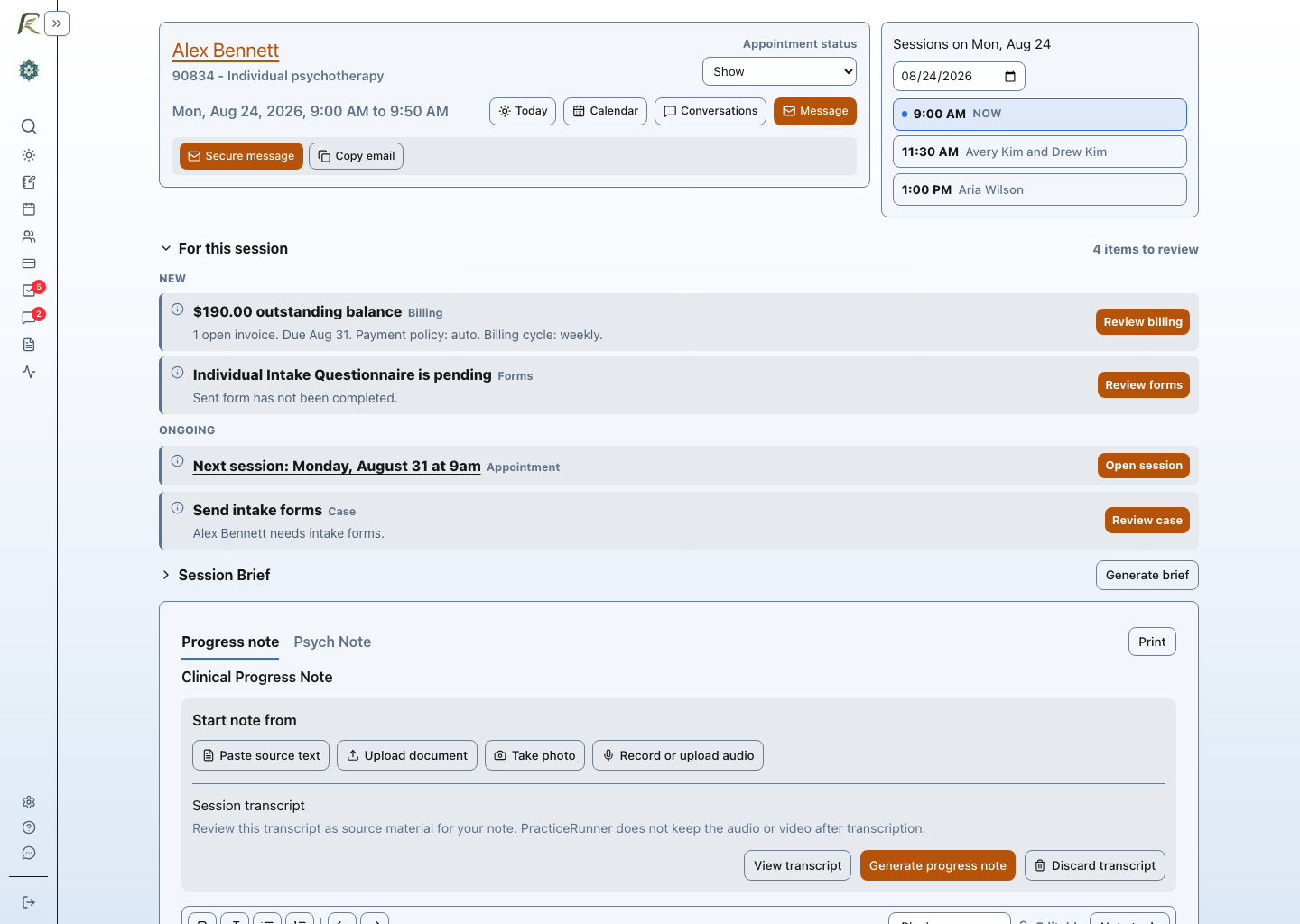
PracticeRunner takes a more session-centered approach. Its Session Workspace brings the appointment, nearby sessions, relevant case context, source material, notes, an optional preparation brief, recording or media upload, transcription, and clinician-reviewed drafting into one place. Recording and drafting are not tied to a proprietary video platform, so the same workflow can be used for in-person work or alongside a telehealth platform. Source material can also be wider than an audio recording: PracticeRunner accepts video files and can extract text from scanned or photographed documents, in addition to Word documents, PDFs, and pasted text. Published SimplePractice Note Taker upload formats cover audio and text-based documents but not video files or photo and scan text extraction. Notes support SOAP, DAP, and BIRP presets, three additional customizable formats, and clinician or supervisor sign-off. The Case Summary and Session Workspace pages automatically flag attention items needing follow-up, including an unpaid invoice, a payment method that needs updating, or an incomplete form.
Both products now offer treatment-plan assistance. See PracticeRunner treatment-plan setup and review. In PracticeRunner, the clinician selects signed progress notes and submitted forms, then receives proposed treatment-plan field changes tied to those exact sources. Each proposal can be accepted, edited, rejected, or discarded before it enters the plan. Associates can submit the resulting plan for supervisor review, and the supervisor can approve it or return it for changes. SimplePractice describes Treatment Planner as a beta Care Aide capability. The products have not been compared field by field, so the meaningful PracticeRunner claim is its source-linked, clinician-reviewed workflow rather than an assertion that the two tools are equivalent.
| Workflow | SimplePractice Session Sidekick | PracticeRunner Session Workspace |
|---|---|---|
| Primary role | A clinician-only AI sidebar for preparation and live assistance within SimplePractice Telehealth | An appointment-specific workspace for preparation, context, source material, documentation, and review |
| Before the session | Session prep, editable reminders, a summary of the previous session, and the last progress note | Session Brief generated from recent notes, appointment and case details, nearby sessions, attachments, and source material |
| During the session | Editable reminders, Quick Replay of the last 30 to 60 seconds, and an on-demand recap during a recorded telehealth session | Telehealth launch, audio recording, source-material review, and direct note work; no current live replay or in-session AI recap |
| Session formats | Live assistance is built around SimplePractice Telehealth; Note Taker separately supports in-person capture | Works for in-person sessions or alongside Zoom, Google Meet, Teams, or another provider-chosen service |
| Source material | Prior record context and the current Note Taker transcript | Pasted text, outside transcripts, documents, PDFs, scans, handwriting photos, attachments, recorded audio, and uploaded audio or video |
| Documentation | Works with Note Taker for transcription and progress-note drafting | Keeps source material, transcript review, customizable note drafting, editing, saving, and clinician or supervisor sign-off together |
| Standard packaging | Included in Care Aide at $59 per month for the account owner and $49 for each additional clinician | Session Workspace, Session Brief, writing tools, recording, and transcription are included during PracticeRunner's early stage, with no separate transcription charge today |
The practical difference: Session Sidekick provides more active help while a recorded SimplePractice telehealth session is happening. Session Workspace covers a wider span of preparation, session formats, source material, documentation, and review without requiring the practice to use PracticeRunner's own video platform.
A clinician can save up to five reusable AI writing preferences covering wording, tone, or structure, and apply one when turning source material into a progress note draft, whether that source is a PDF, an audio or video transcript, or text extracted from a scan or photo. That last option is genuinely useful for a clinician who still writes session notes on paper: taking a photo with a phone or computer camera turns a handwritten note directly into a draft instead of it being retyped by hand. Temporary extraction uploads are deleted after successful extraction. Unfinished or failed uploads become eligible for cleanup after 24 hours, with retries if deletion fails. Ordinary record attachments remain retained. See source-material guidance. SimplePractice's published materials do not describe a comparable photo-of-handwriting-to-draft workflow.
SimplePractice says retained transcripts are not used to train or change its underlying AI model. Its transcript-retention guide separately describes optional retention of de-identified, de-coupled transcripts to evaluate output and improve prompts and other AI features. Retention defaults depend on when Note Taker was enabled, and clinicians can opt out at the clinician, client, or session level. Audio is deleted after transcription. The transcript available for clinical review lasts up to seven days or until the note is signed and locked; a retained de-identified copy is a separate use. PracticeRunner does not use client information for cross-practice AI improvement, including de-identified information.
PracticeRunner's AI Assistant is optional and disabled by default. Recorded or uploaded media is deleted after transcription, and client information is not used to train shared AI models or improve AI for other practices. A resulting transcript may remain as clinician-controlled source material until the therapist discards it. The clinician decides when to use the tools and remains responsible for reviewing and saving the result. Read the full AI and client information guidance.
Two different approaches to AI packaging
SimplePractice offers Note Taker for $35 per clinician each month at the standard prices checked on September 7, 2026. Two clinicians would therefore pay $70 per month, or $840 per year, for Note Taker alone. The broader Care Aide suite is $59 per month for the account owner plus $49 per month for a second clinician, totaling $108 per month or $1,296 per year for the AI add-on alone. Those figures do not include the underlying SimplePractice subscription.
PracticeRunner currently includes AI writing, appointment preparation, recording, and transcription with all plans during its early stage. No separate transcription charge applies today. PracticeRunner will explain any future allowance or charge before it applies.
Any future recording or transcription allowance or charge will be explained before it applies; no future usage price or allowance is promised here. Read the Fair Practice Pledge for the commitments behind that approach.
Bring your own video. Keep the clinical workflow connected.
PracticeRunner does not require a practice to replace a video service it already knows and trusts. A clinician can use Zoom, Google Meet, Microsoft Teams, or another appropriate service for the meeting itself, then use PracticeRunner for session preparation, source material, optional recording or media upload, transcription, clinician-reviewed drafting, documentation, and follow-up.
SimplePractice takes a more closed approach to video appointments. Its published workflow centers on the SimplePractice Telehealth Video Office: selecting that location generates a SimplePractice meeting link, the appointment launches SimplePractice Telehealth, and telehealth reminders insert SimplePractice's client video link. Its documentation does not describe a place to save and launch a clinician's own Zoom, Google Meet, Teams, or other external meeting link from the provider, client, or appointment workflow. A therapist can still send an outside link manually, but that is different from having the external video service integrated into the ordinary appointment workflow.
For a HIPAA-oriented cost comparison, the outside video account must be more than a free meeting link. The examples below assume either Zoom Workplace Pro with a Zoom BAA or a paid Google Workspace account with the Google Workspace BAA. A personal Gmail account, Google Workspace Individual subscription, free Zoom account, or pasted meeting URL should not be treated as a substitute for the appropriate account, agreement, configuration, consent process, and professional review.
The PracticeRunner workflow is broader in some other directions. Source material can come from an outside transcript, pasted notes, supported documents, scans, photographs of handwritten material, recorded audio, or uploaded audio and video. Session Brief, transcription, reusable writing guidance, note drafting and revision, session context, and follow-up remain available without tying the workflow to a proprietary video client. SimplePractice has its own advantages, including live Session Sidekick assistance inside SimplePractice Telehealth, treatment-planning tools, intake summaries, and client-facing session summaries.
Insurance is the clearest SimplePractice advantage
If electronic insurance work is central to your practice, SimplePractice is likely the better fit today. Its Essential and Plus plans include integrated electronic claims, eligibility checks, and ERA automation.
PracticeRunner supports statements, superbills, reviewed CMS-1500 claim PDFs, and manual reconciliation of payer responses with related invoices. It does not currently submit claims electronically, verify eligibility, or post ERAs automatically. That makes PracticeRunner a more natural fit for private-pay, out-of-network, or selectively insurance-based practices than for a practice that depends on a fully integrated insurance revenue cycle. Where PracticeRunner does automate, it is deliberately conservative: monthly superbills generate and send automatically for opted-in clients, but only once every session in that month has a fully paid, settled invoice, rather than firing on a fixed date regardless of payment status.
PracticeRunner also supports general appointment descriptions and preserved billing documents, invoice voiding with linked-session review, and portal bank-account verification. Claim replacements and void forms are available before a financial payer response; post-payment corrections remain outside PracticeRunner's supported workflow.
Calendars, scheduling, and mobile access
SimplePractice has stronger external calendar sync. It offers two-way Google and Outlook synchronization on qualifying plans, with plan-specific differences, while Apple Calendar synchronization is one-way. PracticeRunner currently sends appointments one way from PracticeRunner to Google Calendar. PracticeRunner also offers optional calendar subscription feeds for providers and, on a per-client basis, for clients themselves, so any calendar app, including Apple Calendar, can subscribe to a live appointment feed. A practice can also set a client's automated email reminders to stand down once that client is on a feed, on the premise that the subscribed calendar entry's own reminder covers it. SimplePractice's published documentation does not describe an equivalent client-facing feed or feed-tied reminder setting.
PracticeRunner adds some scheduling details designed for ongoing clinical work. Recurring appointments are checked for current conflicts when a series is created, then periodically scanned again as the calendar changes so newly introduced conflicts can become follow-up tasks. Practices can also track a configurable number of planned absences for each case and apply their attendance policy consistently. A practice can also let PracticeRunner auto-accept new booking requests, reschedule requests, and cancellation requests once they clear a configurable notice window, rather than reviewing every request by hand. Separately, a provider can share busy-time blocks with another PracticeRunner practice or provider, with each connection controlling whether the shared time appears on the receiving calendar and whether it blocks portal self-scheduling. SimplePractice's published materials do not describe comparable cross-practice busy-time sharing.
For mobile work, SimplePractice offers native clinician and client apps and supports Tap to Pay through its clinician app. PracticeRunner uses a responsive web application that can be installed from a supported browser on a phone, tablet, or computer, but it is not a native mobile app and does not offer Tap to Pay.
An open practice system, not a walled garden
PracticeRunner is designed to fit into a therapist's practice without turning calendars, video calls, source material, or records into reasons to remain inside one company's ecosystem. That philosophy shows up across the product: direct Google Calendar sync and calendar feeds, support for outside transcripts and other source material, provider-chosen video links, and exports intended for backup or migration. This does not mean PracticeRunner connects to every service or reads every format. It means clinician choice and practical data portability are product priorities.
A video link, for any platform, Zoom, Google Meet, Teams, or another, can be set at the provider, case, or individual appointment level, with a more specific link overriding a more general one. SimplePractice's video appointments default to its own built-in Telehealth; using a different platform instead is a manual workaround, not a supported field, based on SimplePractice's own community support materials.
The same approach carries over to calling, texting, and emailing clients. PracticeRunner lets each clinician choose, separately for desktop and mobile, which phone, texting, or email tool opens for those actions. Options include Google Voice and services such as Zoom Phone. A practice can keep using the communication tools it already relies on instead of working around a fixed default. SimplePractice's published materials do not describe a configurable equivalent.
SimplePractice's public export guide documents what its export contains and how the folders are organized. Clinical and billing records are delivered as documents in client folders, while contacts are exported as VCF files. The guide states that appointments are not included and describes the folders rather than a machine-readable schema for reconstructing the practice in another system.
SimplePractice does support a narrow, structured inbound transfer. Its support-assisted client-profile workflow accepts SimplePractice's required template as an XLSX, ODS, or CSV file. The accepted fields are limited to client status, first and last name, name used, primary clinician, mobile phone number, home email address, and consent to email. SimplePractice states that appointments, clinical documentation, billing documents, and payment information are not transferred through this workflow. Those records must be recreated or uploaded separately. Its published import and export guidance does not describe FHIR support.
Take it or leave it? Take it. PracticeRunner supports that limited document-and-contact model so a practice can create supported record PDFs and VCF contact files. It does not stop there. From Settings → Data Export, a practice can create a much more comprehensive PracticeRunner export with migration-friendly CSV files, note text, generated PDFs, original uploaded files, and complete structured PracticeRunner data when selected. The background export preserves more of the relationships among clients, cases, appointments, clinical records, and billing history, making the package more useful for backup, review, restoration, or future migration.
PracticeRunner also imports and exports FHIR R4, a widely used standard for exchanging health information. A practice can create either a FHIR R4 export with PracticeRunner extensions for the closest supported round trip or a standards-only FHIR R4 export for broader portability. Both are password-protected ZIP files containing a JSON Bundle and a conversion report that identifies known details that were removed or could not be represented. PracticeRunner can import a FHIR R4 JSON Bundle or ZIP package after validating its structure and references.
A FHIR export is not a complete PracticeRunner backup, and PracticeRunner does not provide a FHIR server or SMART on FHIR API. Whether another system can use every exported resource depends on that system's own FHIR support and implementation. The standards-based option gives a practice a documented clinical exchange format alongside PracticeRunner's more complete native backup.
PracticeRunner's separate Contact Import and Export workflow accepts spreadsheet CSV or VCF/vCard files directly, with a preview before changes are saved. It supports common split-name and full-name spreadsheet layouts, including the SimplePractice Client Details Report. Its VCF workflow can also preserve supported case membership for couples, families, therapy groups, individual consultations, and consultation groups. Legacy combined couple cards from SimplePractice are imported as two contacts in one couple case, not as two unrelated individual cases. This workflow does not import appointments, clinical notes, billing history, forms, files, or payments.
Active client and case-member contact details can also be downloaded separately as CSV or VCF/vCard files. The VCF export uses individual contact cards plus group cards for supported cases, which allows a PracticeRunner round trip to reconstruct the people and their case membership. Another contacts app may keep the individual contacts while discarding group or PracticeRunner-specific case fields, and no export can guarantee that another EHR will import every record automatically. An open system should still provide both familiar files and a documented structured record instead of forcing a practice to choose between portability and completeness.
Sign-in, search, and documents
PracticeRunner was designed passkey-first. Staff can use a passkey, request a one-time email sign-in link, or use enabled Google or Microsoft sign-in. An owner can require a passkey or security key for all staff, require physical security keys for owners, or require physical security keys for everyone. Email, Google, or Microsoft sign-in does not bypass one of those policies. Because a passkey is tied to the real site, it is resistant to phishing, and staff can sign in with a familiar Face ID, Touch ID, Windows Hello, device PIN, or security-key action. The client portal also uses an emailed sign-in link, with an optional saved passkey for easier repeat access.
SimplePractice documents optional 2-step verification by text message or an authenticator app. Its account owner can review whether each team member has enabled 2-step verification, but SimplePractice states that the owner cannot enable or disable it for the team member, and no practice-wide requirement is described. Its optional authenticator-app verification can still add meaningful protection. SimplePractice's published staff-login materials do not describe passkey support or Google or Microsoft staff sign-in. PracticeRunner takes a different approach by combining passwordless sign-in options with phishing-resistant credentials and authentication policies the practice owner can enforce.
Day-to-day, one search across your practice finds clients and cases, appointments, invoices, superbills, statements, settings, and help articles from a single query, without requiring you to know which section of PracticeRunner to search first.
PracticeRunner's document editor includes a variable picker for client, provider, practice, address, and supported service-price details, with a preview before sending. Review the prepared document; saved or signed documents are not meant to change silently when a profile or fee changes later. SimplePractice documents macros for emails and reminders and configurable document templates. Its reviewed guidance does not establish the same general variable-picker workflow inside document text.
The two products also take different approaches to writing and building content. SimplePractice's template builder is block-based: notes, documents, and forms are assembled from content and format blocks, and customizing note or document templates requires the Essential or Plus plan. PracticeRunner uses two lighter-weight editors instead of one shared system: progress notes and psychotherapy notes use a simple formatting toolbar for bold, italic, and lists, while documents and forms use a fuller markdown editor with headings, section dividers, the variable picker described above, and a live side-by-side preview. A document does not have to be written in markdown at all: a practice can instead upload a PDF and use it as the document's content, without needing a specific plan.
Questionnaires have their own editor, with ready-made packs of standard forms a practice can install, including measurement-based-care and screening measures such as the PHQ-9, GAD-7, and AUDIT-C. A questionnaire can also be exported as editable text or as a complete JSON file and re-imported, with JSON required for a scored assessment so its scoring and alert behavior carry over correctly. SimplePractice's client-export guide describes completed records and contact files, without describing a reusable questionnaire/template export format. This is a documented-workflow difference, not a claim that SimplePractice has no other transfer options.
For PDF-based documents, SimplePractice says uploaded PDFs can be shared but cannot be edited or signed within its portal. Clients can download, sign outside the platform, and upload them again. SimplePractice's editable consent forms and Other Documents are separate signing workflows. PracticeRunner can use an uploaded PDF as a document's source and apply supported signatures to it.
Payment control, pricing, and a realistic cost comparison
Subscription price is only one part of the cost. Payment mix can matter more for a practice with a high session fee or steady volume. SimplePractice's published integrated-payment rate is 3.15% + $0.30 for both cards and bank-account payments. PracticeRunner charges the same rate for cards and approximately 1% for bank transfers, capped at $8.
Both products support changing what a client is charged, but the rate behaves differently. SimplePractice lets a practice set a custom rate for a client's service or add a discount manually as a negative-rate service or product. That establishes or adjusts the amount owed; it does not make the price change automatically according to how the client pays.
PracticeRunner can apply a live payment-method rule instead. A practice creates reusable payment profiles, then assigns the appropriate profile to each case. The profile specifies which payment methods that case may use, along with any per-session discount for bank transfers or recorded manual payments and any payment instructions. The same session can therefore keep its standard price for a card payment and use the configured discounted price when paid by an eligible lower-cost method.
SimplePractice's payment-link documentation says the client can pay by card or connect a bank account. Its published settings do not describe a case-level or client-level control for offering one of those integrated methods without the other. In PracticeRunner, the assigned payment profile can make card, bank transfer, or accepted manual methods available or unavailable for that particular case, as well as define the discount attached to each supported lower-cost method.
This gives a practice a practical way to share part of the savings from avoiding credit-card processing. For example, a therapist could offer a small per-session discount when a client pays by bank transfer, or when the practice records a manual payment made by Zelle, check, cash, or another accepted method. The practice chooses the discount and communicates it through its own financial policy. The discount changes the client's session price and is separate from the processor's transaction fee.
SimplePractice supports manually charging for an individual future appointment or recording a client payment as credit. PracticeRunner can instead create invoices in advance of scheduled sessions on a daily, weekly, or monthly schedule. This allows advance billing to follow the practice's ordinary cadence instead of requiring every future session to be invoiced individually. Schedule changes and cancellations may require the projected billing to be reconciled afterward.
50 ways to leave your EHR? Start with what actually moves.
PracticeRunner built a guided SimplePractice importer because meaningful portability requires more than telling therapists they are allowed to leave. The same import process helped move the founder's own clinical practice from SimplePractice to PracticeRunner, and it is now available inside the product for other practices making that transition.
From Settings → Data Import, a practice can upload its complete SimplePractice export ZIP. The import can bring over client contact information, progress notes, psychotherapy notes, invoices, superbills, statements, insurance information found in supported documents, and other supported documents and forms.
SimplePractice does not include calendar data in its export. PracticeRunner therefore attempts to reconstruct historical appointments from invoice and superbill dates of service and from note dates and times when they are available. Records without a reliable time are marked for review. Imported invoice status preserves useful billing history, but it does not create duplicate payment transactions or recreate a processor ledger.
The practice uploads its own export from Settings, and processing may wait for PracticeRunner support to inspect and start it. The import has no additional cost. During PracticeRunner's current early stage, migration support and the recommended PracticeRunner support review are also free. Most reviews receive a response within 24 hours, although this is an expected turnaround rather than a guaranteed service level.
See what moves from SimplePractice and how the guided import works.
Which one should you choose?
Choose SimplePractice if integrated insurance automation, native mobile apps, Tap to Pay, live assistance inside built-in telehealth, or the confidence of a mature platform is essential enough to outweigh its higher standard subscription price and more preset integrated-payment options.
Consider PracticeRunner if your practice is private-pay, out-of-network, or selectively insurance-based; if you want couples, families, and therapy groups treated as cases in their own right, with client-specific note addenda when needed; if professional consultation or workshop groups should have their own non-therapy workflow; if you want daily work organized around the session; or if you want more control over the financial side of the practice. PracticeRunner lets you decide which payment methods each case may use, automatically apply payment-method discounts, use lower-cost bank transfers, bill scheduled sessions in advance, and start at a lower standard subscription price. Included AI writing and preparation tools, hands-on onboarding, and guided migration strengthen that value further.
The right answer may also be to stay with the system you already know. Changing practice software carries real work and risk. A comparison is useful only when it makes the tradeoffs clearer enough to decide whether that change is worthwhile.
Explore PracticeRunner
See whether the workflow fits your practice
PracticeRunner is available for independent therapists, with hands-on onboarding and direct founder support during this early stage.
Sources checked
The September 7 review also checked Link bank-payment fees, Note Taker upload formats, and Treatment Planner. Absence from these public workflows is not proof that a feature is unavailable in every account.
Authentication details were checked against SimplePractice's 2-step verification guide and its documentation of team-member 2-step controls.
This comparison used SimplePractice's public pricing, AI Note Taker and data-use information, Care Aide, Session Sidekick, couple profiles, group appointments, group notes, Telehealth workflow, Telehealth reminder workflow, calendar sync, online payments, payment links, custom client rates, manually configured discounts, advance charging, data export, and EHR transfer template materials. EngageSmart ownership information comes from Vista Equity Partners' January 2024 acquisition announcement. External-stack pricing and BAA guidance came from Google's official Workspace business-edition pricing and HIPAA guidance, plus Zoom's official Workplace Pro pricing and BAA guidance. Feature availability may depend on plan and configuration.