
Manual or automatic billing
Billing inside the wider practice workflow
Billing that matches how your practice works
PracticeRunner supports manual billing, automatic invoicing, AutoPay, credit cards, lower-cost bank transfers, portal express payments, invoices, statements, superbills, CMS-1500 claim PDFs, manual payer-response reconciliation, and recorded outside payments.
Use the billing workflow that fits your practice: charge automatically after sessions, send invoices weekly or monthly, let eligible clients use Apple Pay or Google Pay in the portal, hand a payment to the client's phone with a QR code, collect by card or bank transfer, or record payments that happen outside the software.
For insurance-billable services, prepare and review a CMS-1500 PDF, then manually record the payer's allowed amount, payment, contractual adjustment, and patient responsibility when the response arrives.
Flexible billing for real-world private practice, with invoices, payments, and follow-up in one system.
Clear billing policies
Billing needs boundaries, too
For many practices, billing problems show up as missed payments, unclear routines, manual follow-up, and too many exceptions living outside the system.
PracticeRunner is designed to help with the workflow around payment, not just the transaction. Set practice defaults for credit cards, bank transfers, manual payments, or a mix, then assign a different payment profile or collection schedule to a case when needed, whether it involves an individual client, couple, family, or group. Saved payment methods stay with the billing contact responsible for payment.
For therapy practices, the financial workflow is one part of the agreement around care. Clear settings for payment timing, portal access, and exceptions help clinicians apply billing policies consistently without turning every decision into extra administrative work.
Cards, portal express payments, and lower-cost bank transfers
Pay-by-phone handoff from an invoice
Recorded outside payments
Client-Friendly Checkout
Let clients pay on the device already in their hand
The portal keeps client-initiated payment on the client's own device. When card payments are available, Stripe can present Apple Pay or Google Pay as an express option for an eligible device, browser, and wallet.
Staff can also hand off an in-person payment without entering the client's wallet or card details on a practice computer. The QR code opens a secure, invoice-specific portal payment link and expires after a short period.
Apple Pay and Google Pay in the portal
Eligible clients can see Apple Pay or Google Pay as express options when they open an invoice or manage payment methods in the portal. Availability depends on the card settings, connected Stripe account, and the wallet supported by the client's device and browser.
Pay by phone while meeting in person
Open an unpaid invoice, choose Record payment, then Pay by Phone. The client can scan a time-limited QR code or open its secure link. Payment stays on the client's device, and the staff payment dialog checks for the completed payment.
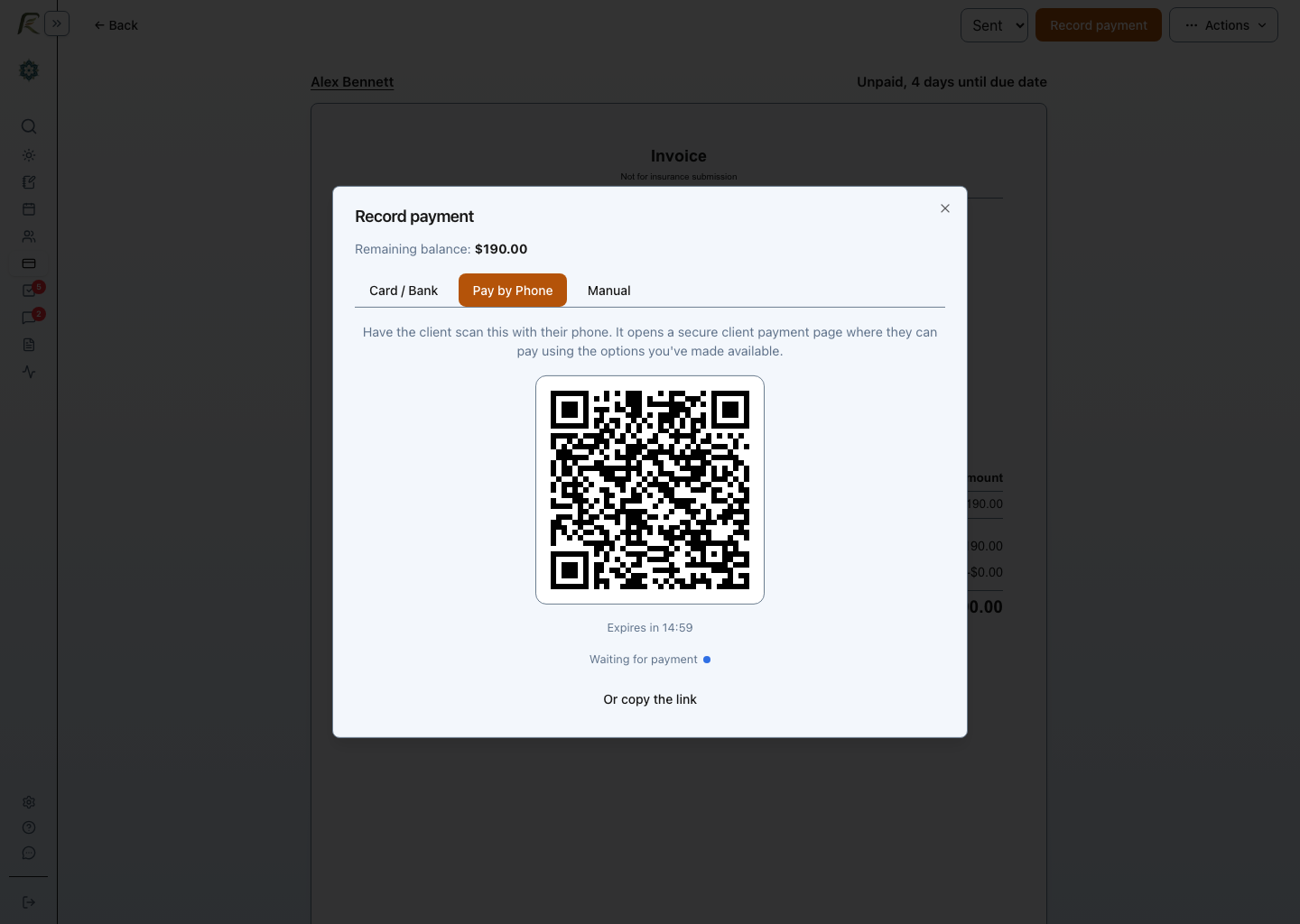
Apple Pay and Google Pay are portal express options for eligible card payments. Pay by Phone is a secure portal handoff, not Tap to Pay or card-present processing.
Bank Transfers And Cards
Why choose bank transfers over credit cards?
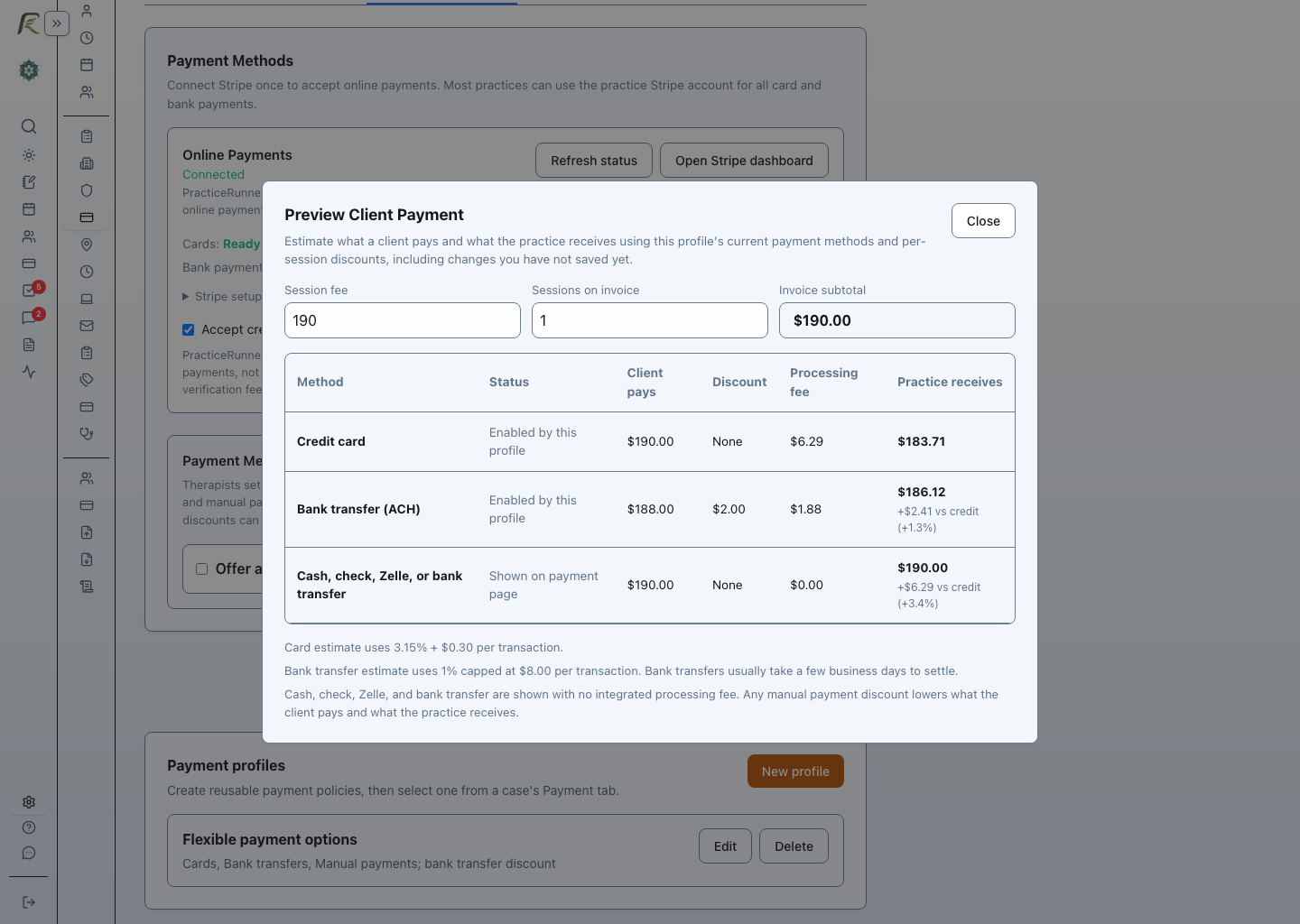
Credit cards are convenient, but they usually carry higher processing costs. Bank transfers can be a lower-cost option, especially for recurring billing and larger payments.
PracticeRunner helps you use bank transfers without forcing one billing style on the whole practice. Bank transfers are processed through ACH and settle more slowly than cards, so it usually takes a few business days before funds are final.
Credit cards
- Familiar and convenient
- Higher processing costs
- Useful for fast, simple payments
Bank transfers
- Lower-cost alternative
- Strong fit for recurring billing
- Better aligned with larger payments
- Usually settles a few business days after submission
Different practices use different payment methods. PracticeRunner supports both while helping you encourage lower-cost options where appropriate. You can set defaults for the whole practice and assign reusable payment profiles to cases that need a different arrangement.
Fair Bank Transfer Pricing
Keep bank transfer pricing aligned with actual costs
Many practices assume every digital payment should be priced like a credit card. But bank transfers work differently.
PracticeRunner is designed around a straightforward principle: a lower-cost payment method should be priced like a lower-cost payment method. The approximately 1% fee is capped at $8 so larger bank transfers do not become disproportionately expensive.
Example
A larger bank transfer should not feel like a larger credit card charge.
Smaller payment
Bank transfers stay straightforward for everyday billing, but they usually take a few business days to settle.
Larger payment
Costs should still feel predictable instead of expanding like a card charge.
Flexible Billing
Choose how billing actually works
Payment method is only one part of the picture. PracticeRunner also gives you flexibility in how charges are created, sent, collected, or recorded.
Practices can use per-session discounted pricing for bank transfers or recorded manual payments to share part of the savings from avoiding credit-card processing with clients. For example, a practice may offer a small discount for bank transfer, Zelle, check, cash, or another accepted manual method, with reusable payment profiles for cases that need a different arrangement.
AutoPay
Automatically collect saved bank transfer or card payments when charges are due.
Automatic invoicing
Send invoices automatically while letting clients complete payment themselves.
Manual collection
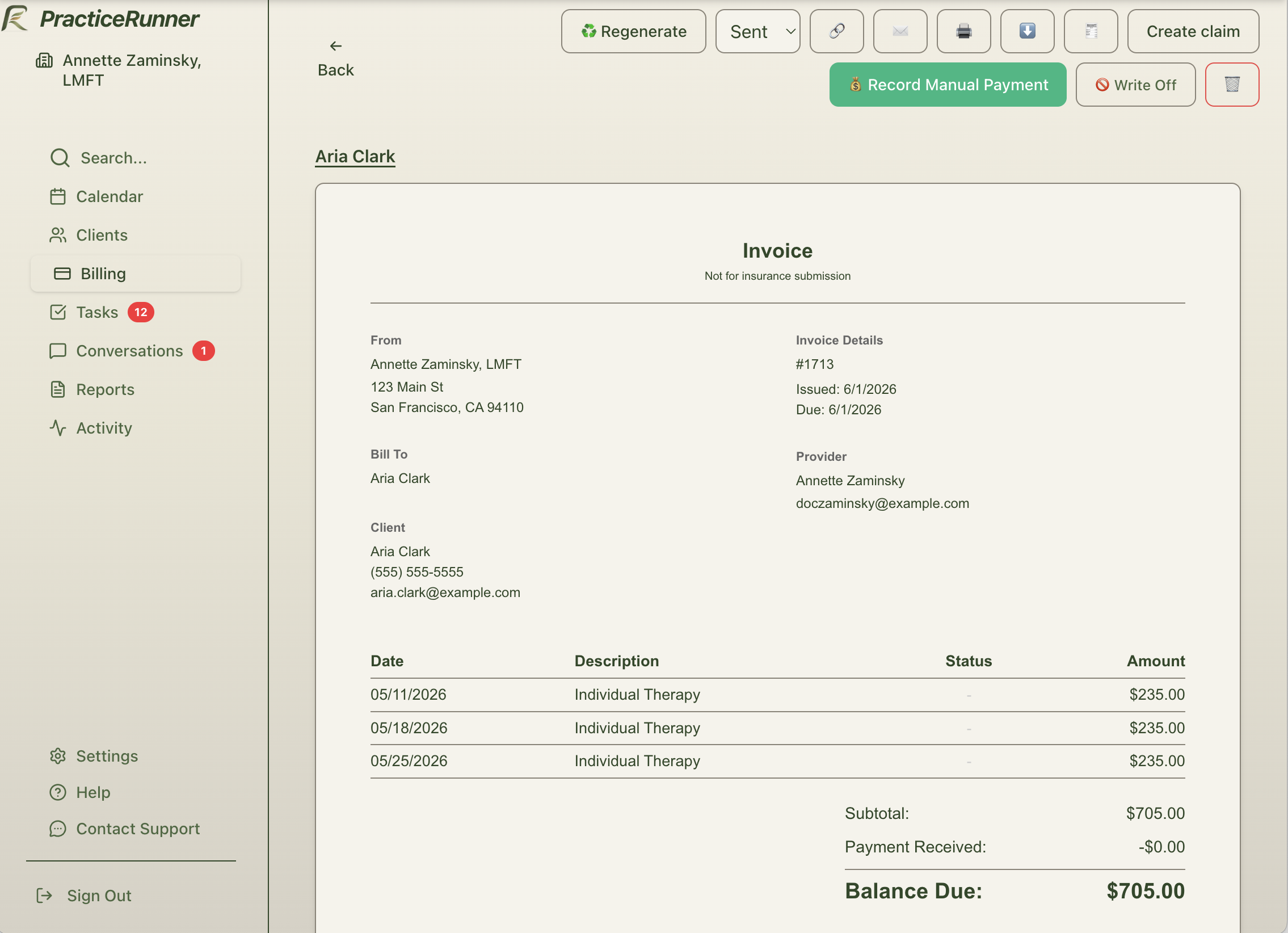
Keep things hands-on where needed, including externally recorded check, cash, Zelle, or other outside payments.
Let billing run automatically where you want to. Stay manual where you need to.
Billing Models
Support different billing approaches in one system
Different practices use different approaches to getting paid. PracticeRunner is built to support more than one model.
Pay-per-session
Bill for appointments on a daily, weekly, or monthly schedule.
Pre-billed payments
Charge ahead of time to make income steadier and reduce missed payments.
Recurring billing
Use recurring monthly billing when it fits your practice policy and client communication.
Trust And Transparency
Built for clear, transparent billing policies
Flexible billing options like bank transfer pricing, pre-billing, recurring billing, and optional per-session discounts can be configured in a way that is clear, fair, and aligned with standard practice policies. A practice can use those discounts to share part of the savings from avoiding credit-card processing with clients who pay by bank transfer or a recorded manual method.
- Clear billing steps for clients
- Flexible policies by practice and by case
- Gradual changes without forcing a sudden shift
Common Questions
Common questions practices have
Can I offer lower pricing for bank transfers?
Yes. PracticeRunner supports per-session discounted pricing for bank transfers or recorded manual payments, giving a practice the option to share part of the savings from avoiding credit-card processing with clients. You can set a practice default and assign a different payment profile to a case when needed.
Can I require bank transfers instead of cards?
Yes. You can decide at the practice level which payment methods you accept, including limiting online payments to bank transfers. You can also assign a different payment profile to a case when needed.
Can clients use Apple Pay or Google Pay?
Yes, as portal express options when card payments are enabled and Stripe recognizes an eligible wallet on the client's device and browser. Clients who do not see an express option can continue with the card or bank-transfer choices available for their invoice.
Is pre-billing allowed?
Many practices use pre-billing as part of a clearly documented financial policy. PracticeRunner supports a clear setup and a gradual rollout.
Do I have to switch every client at once?
No. PracticeRunner is designed to help you transition gradually, keeping your current approach where needed and introducing new billing options over time.
Do I have to make everything automatic?
No. You can use AutoPay, automatic invoicing, or manual collection depending on what works best for each part of your practice.
What if I already handle payments manually?
PracticeRunner can support a gradual transition, so you can keep familiar routines in place while introducing bank transfers, card payments, or automation selectively.
Transition
Move from manual billing at your own pace
Changing an established billing routine can bring up understandable ambivalence. PracticeRunner supports a case-by-case transition, so new options do not have to become a practice-wide reset.
Today
- Keep familiar billing routines in place
- Continue manual collection where needed
- Avoid forcing immediate pricing changes
Next
- Introduce bank transfer or card payments for new clients
- Use invoicing or auto-pay selectively
- Apply per-session discounts or payment preferences where appropriate
Later
- Shift more clients to lower-cost payment methods
- Make payments easier for clients to complete
- Make practice income easier to plan around
Changing billing workflows does not require a practice-wide reset.
Scenarios
What this can look like in practice
New clients on bank transfer, long-time clients unchanged
A therapist keeps long-time clients on manual billing while putting new clients on bank transfer AutoPay, making payments easier without disrupting existing relationships.
Automatic invoicing with selective manual payment
A practice sends invoices automatically every Friday, while still allowing some clients to stay on manual payment based on what fits the relationship.
Using discounts or bank-transfer-only policies to guide payment choices
A practice shares part of its lower payment cost by offering a small per-session discount for bank transfers or recorded manual payments, or chooses to accept only bank transfers online for part of the practice while allowing exceptions case by case.
Benefits
Why practices choose clearer billing
Make payments easier
Spend less time following up on unpaid balances.
Make income steadier
Use billing habits that help you plan with more confidence.
Lower payment costs
Encourage lower-cost methods like bank transfers where it makes sense.
Stay flexible
Adopt changes gradually and shape billing around your practice.
Part Of The Practice Workflow
Scheduling, documentation, and billing in one system
Manage appointments, clinical notes, invoices, and client messages in PracticeRunner. When a payment needs follow-up, you can review the invoice and contact the client in the same system.
- Scheduling and calendar
- Clinical notes and documentation
- Client portal, passkey sign-in, and messaging
- Intake and client follow-up
- Supervision and admin coordination
- Billing and invoicing
- Insurance support
Build a clearer billing routine
See how PracticeRunner can help you reduce follow-up, simplify collections, and keep payment choices connected to the rest of your practice.
Shaped by clinical workflow experience and collaboration with fellow therapists, PracticeRunner supports the financial side of real private practice without making it the whole story.