
Last month, I wrote about making the clinical day clearer. September's work followed that theme, with more attention to what happens between appointments: preparing for the next session, reviewing notes, updating treatment plans, responding to a client, and helping someone change an appointment without a long exchange of messages.
These are ordinary parts of running a practice. They're also places where a few unnecessary steps can add friction to the day.
Clinical information close at hand
On a busy clinical day, useful information can be spread across session notes, intake forms, assessments, and a treatment plan. Having it close at hand can help you return to a longstanding theme, follow up on a commitment, or consider how treatment is progressing toward a client's goals.
PracticeRunner brings Session Brief, the note assistant, and the treatment plan assistant together as an integrated suite of optional AI tools for preparation, documentation, and planning. They help busy clinicians bring relevant information into view and spend less time gathering it, supporting thoughtful care across appointments.
Session Brief: arrive with the context in view
Bion's invitation to approach a session “without memory or desire” highlights a tension in how we prepare for therapy. How much preparation do you need, and of what kind? On the one hand, we can keep the relevant history close at hand. On the other hand, we must remain open to what the client brings and what emerges in the field, rather than assuming that each person will stay on the same rails as before.
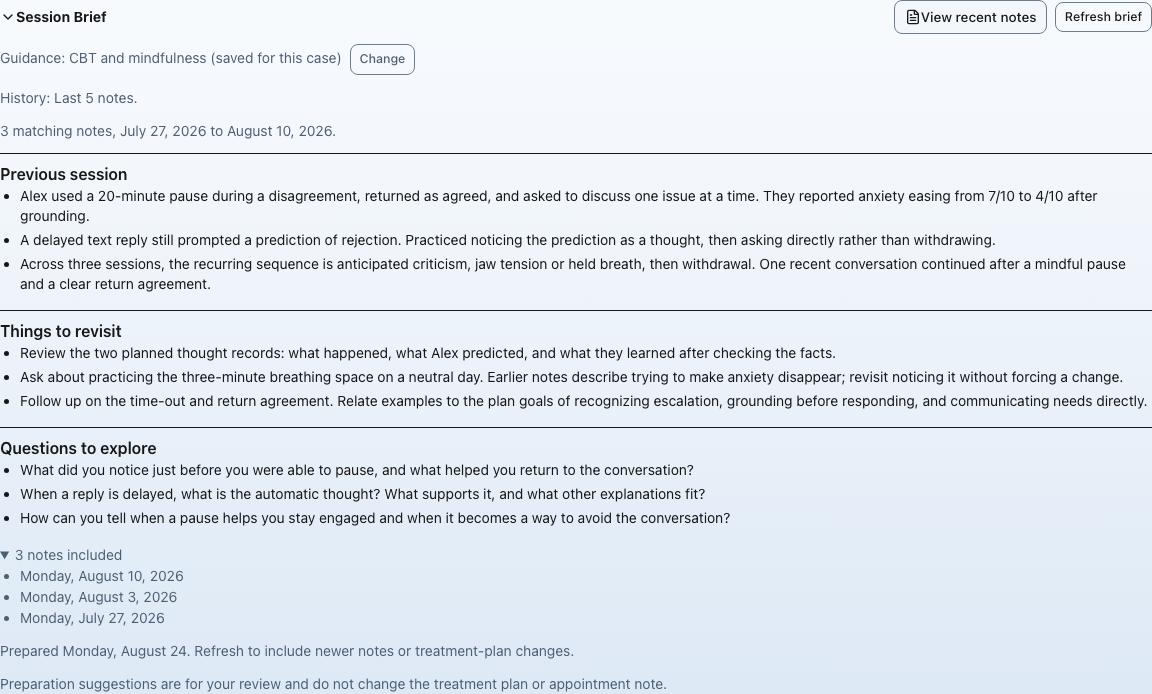
I find that reading notes before an appointment can help reorient me to a client's situation and some of the longstanding themes in the therapy. Session Brief helps you orient before the next session, drawing on saved notes and the active treatment plan.
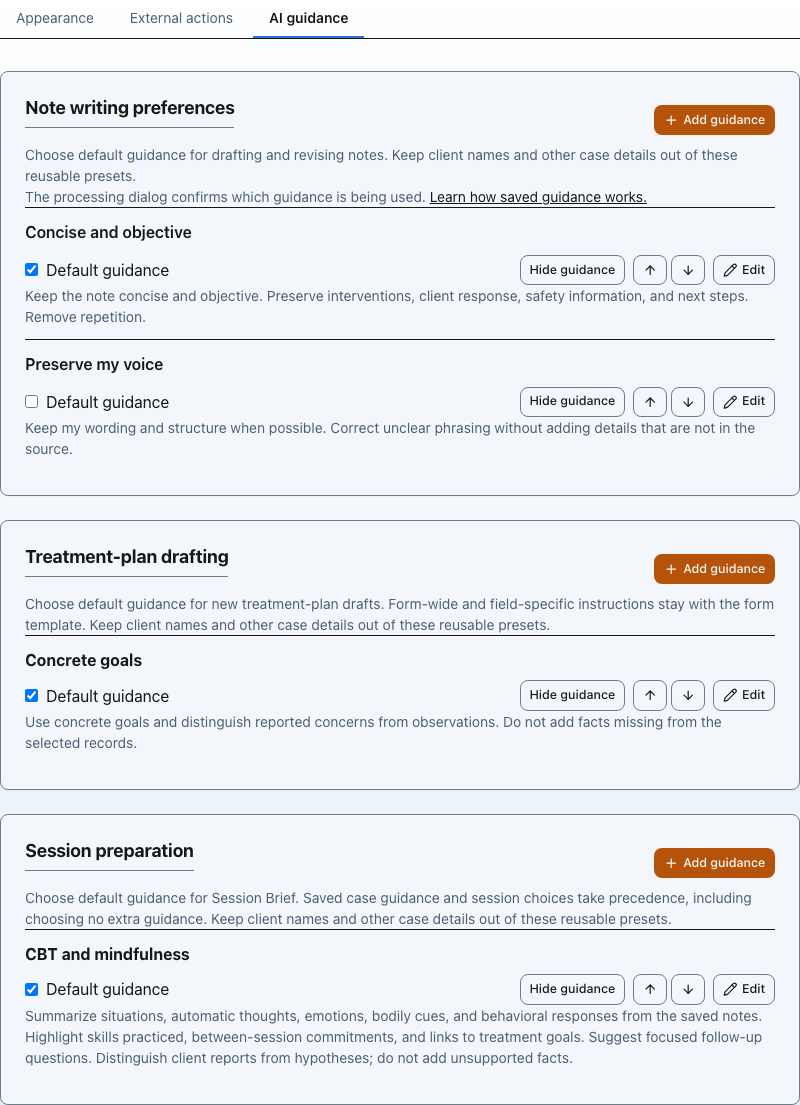
You can choose the scope: the last five notes, the past year, notes associated with a treatment plan, or all available notes. Saved guidance presets let you tailor preparation to your approach, whether that's psychodynamic, relational, CBT, EFCT, or another theoretical orientation. The brief is preparation material, separate from the clinical note.
The note assistant: document the session
After the session, the note assistant helps prepare or revise a draft from the source material you choose. Reusable guidance lets you describe how you want notes organized and what you want them to emphasize. Pasted source material can now be edited directly, making it easier to correct your input before drafting.
You review and edit the draft before signing. Saved notes can then inform preparation for a later appointment, helping you revisit themes and follow up on commitments from earlier sessions.
The treatment plan assistant: connect the details to the plan
When it's time to create or revise a treatment plan, the treatment plan assistant helps bring together what you've documented in sessions, intake forms, and assessments. You select signed progress notes and submitted forms, then request proposed changes to the fields in your draft. Each proposal cites its supporting sources so you can check it against the information you've selected.
Saved drafting guidance and instructions for the particular request help tailor the suggestions. Treatment-plan forms can also carry instructions for the whole form or individual fields. You accept, edit, or reject each proposal before it becomes part of the plan. Activation and, when relevant, required supervisor review remain separate steps. The treatment-plan guide explains the workflow.
Together, these tools connect preparation, documentation, and planning: notes help you prepare, the session informs the next note, and selected clinical information helps you revisit the plan. The active plan can then inform the next Session Brief. Each tool is optional, and you decide what information to use and what belongs in the clinical documentation. The aim is to make relevant history, goals, and follow-up easier to keep in view while clinical judgment stays with you.
Keeping the conversation going
This happened once before,
When I came to your door,
No reply.
A client receives an email and replies. That should be a straightforward exchange. Yet a “do not reply” address can stop that exchange before it starts.
When you send an ordinary email through PracticeRunner, you can choose whether the client's response goes directly to your email inbox or returns to the conversation in PracticeRunner. Direct inbox replies let you continue the exchange in your email program; replies routed through PracticeRunner stay in the app's conversation history. Exchanges that continue directly in your own mailbox are not saved in PracticeRunner.
You can also opt in to receive full message copies from PracticeRunner in your inbox and use the email program you already work with. When a copy invites you to reply, you can respond to your client directly from your email program. Your reply passes through PracticeRunner and stays in the conversation history; replies to secure messages are delivered in the client's portal. The email routing preferences guide explains how to set this up.
Unread tracking, filtering, and scrolling also improved for longer conversations. Appointment emails now include location and access instructions appropriate to the session, so clients have more of what they need before arriving or joining online.
A portal that reflects the client's relationships
One person may participate in more than one case: individual therapy alongside couple work, for example, or a family case as well as a group.
The client portal now has a case selector, making it easier to move between those contexts and see the relevant appointments and messages.
Changing appointments with fewer back-and-forth messages
Online scheduling needs to follow the boundaries of the practice.
September's updates strengthened portal cancellation and rescheduling so they apply your current settings and explain when an action is unavailable. Clients can also see whether an appointment has been canceled or whether their request is waiting for your approval.
There were smaller improvements to the calendar, too, including recurring appointment handling and a check for future appointments before closing a case.
Help shape what comes next
I continue to develop PracticeRunner by using it in my own practice and learning how other therapists work. The details vary, but the useful questions are often similar: where are we repeating ourselves, what is difficult to find, and which steps could be simpler?
Next, I'm working on insurance workflows and refining the user interface for Session Brief, the note assistant, and the treatment plan assistant. The aim is to make the interface more intuitive, with clearer review steps throughout.
If there's a part of your day you'd like PracticeRunner to handle better, send me a note. Specific examples help shape what I build next.