
Session Brief
Prepare for a session with selected note history, the active treatment plan, personal guidance, and visible source coverage.
Open an appointment’s Session Workspace, expand Session Brief, and choose Generate brief. Read the preparation suggestions alongside the original notes before the session. Session Brief is separate from the appointment note and does not update the treatment plan.
If the controls are missing, ask an owner or authorized admin to check Settings → General → AI Assistant → Session Brief. The tool is optional and must be enabled for the practice. The controls below reflect the current app; earlier versions may offer fewer history choices.
Choose the history and directions
- Beside Guidance, select Change.
- In Preparation guidance, choose a Preset or No preset, and enter any Additional directions for this case or session.
- Choose Notes to include using the options below.
- Under Apply to, choose This session only or Save for my future sessions with this case when available.
- Select Apply guidance, then Generate brief or Refresh brief. Applying guidance alone does not generate new content.
| History choice | What it includes |
|---|---|
| Last 3, 5, or 10 notes | The most recent available saved notes before this appointment. |
| Last year | Available notes from the year leading up to the appointment. |
| Since current treatment plan became active | Available notes from the applicable active plan’s activation date up to the appointment. This requires a plan that became active before the appointment. |
| All previous notes | Available saved note history before the appointment. |
New history preferences start with five notes. Existing saved 3, 5, or 10-note preferences remain in effect. Blank notes are excluded. Saved unsigned notes can be included, so check their status and content when reviewing the sources. A historical appointment uses history before that appointment, not notes written for later sessions.
For eligible clinical cases, Session Brief also uses the active treatment plan. For therapy groups, that is the active shared group plan, rather than a combined summary of every participant’s individual plan or addendum. Consultation preparation uses saved notes without a therapy treatment plan. Session Brief uses original saved notes, not previous generated briefs.
Check which notes were used
Before generation, the workspace shows the matching note count and date span. After generation, expand the history line to see the included note dates and whether the history was sampled. Use View recent notes when available to read the source notes directly.
Longer histories may take more time. When all selected notes fit, all are used. When the history is too large, the latest five selected notes stay in full and a selection of complete older notes is spread across the history. Some older sessions may be omitted. A theme missing from a sampled brief is not proof it was absent from the clinical history.
If there is too little saved context, the tool can report that there is not enough information for a useful brief. Check that earlier appointments have saved note content. If a large request cannot be processed, try a smaller history range and review the omitted history directly.
Keep guidance personal and reusable
Manage presets in Settings → Preferences → AI guidance → Session preparation. A session-specific choice takes precedence over your saved case guidance, which takes precedence over your personal default. Saved case guidance applies to your own future sessions with the case.
To prepare without extra guidance, choose No preset, leave Additional directions empty, and apply the choice. To return to inherited guidance, choose Use saved case guidance or my default. Choose Reset this case to my default guidance to clear a saved case choice. Restoring inherited guidance also restores its history setting.
Refresh when the context changes
Select Refresh brief after changing guidance, saving newer notes, or updating the active treatment plan. A notice identifies when the displayed brief uses previous guidance. Check the preparation date and included note dates even when no notice appears. A brief is a preparation aid, not a current risk assessment or a substitute for reading the record.
How long briefs are kept
PracticeRunner removes generated briefs when the appointment note receives its final signature. Briefs also become eligible for cleanup after 30 days. Your saved guidance, original notes, and treatment plans are kept.
If remaining temporary sources need to be preserved, open Temporary source retention under Appointment attachments and select Pause source cleanup before deletion. The pause includes remaining briefs, source text, and document originals for that appointment. It cannot restore deleted material. Resuming cleanup allows sources from finally signed notes and sources older than 30 days to be removed. See Notes and Source Material for the full retention workflow.
Example: follow progress without flattening the case
In this fictional case, Alex is working on anxiety during recurring partner conflict. Across three sessions, notes describe anticipated criticism, bodily tension, withdrawal, and a grounding practice. A more recent note records a successful time-limited pause and return to the conversation, while delayed replies still trigger predictions of rejection.
Useful preparation distinguishes the new success from the recurring difficulty. It can prompt follow-up on thought records and ask whether pauses help Alex stay engaged or become avoidance. The clinician still reviews the source notes and assesses the current situation rather than treating one improvement as resolution of all concerns.
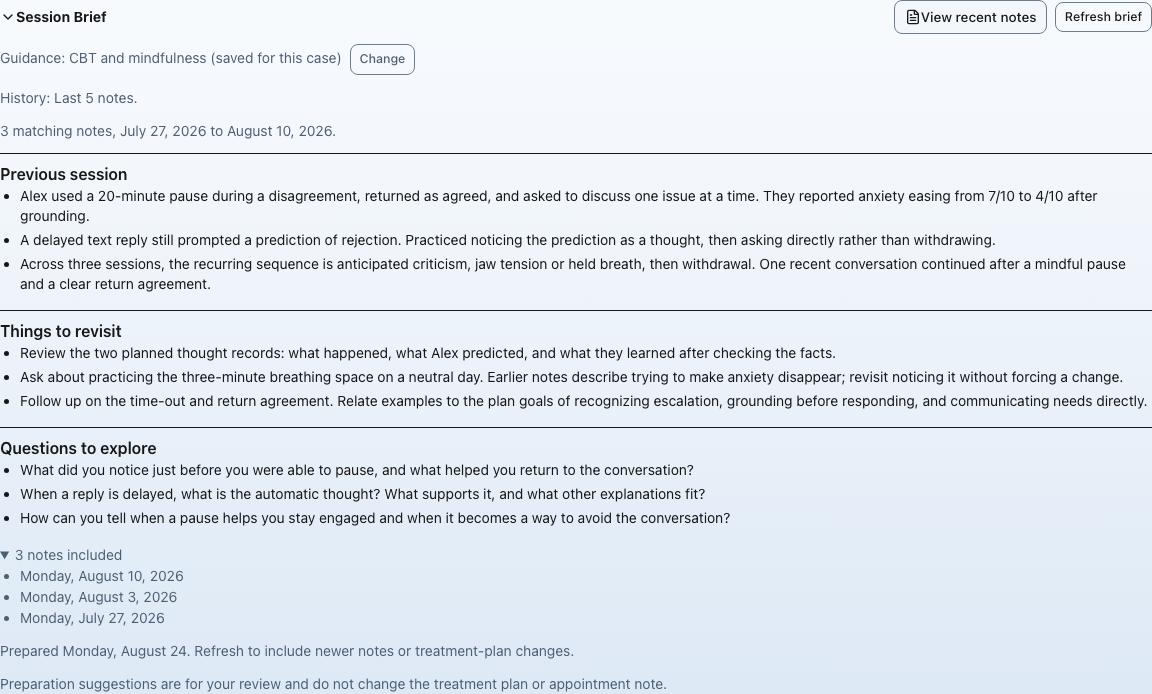
Synthetic case and illustrative brief, not a live AI result. Three notes were available within the chosen five-note limit. History disclosure labels may differ in newer versions. Select the image to view it full size.
For a therapy group, directions could instead ask you to revisit a recent rupture, a member’s return after missed sessions, and whether quieter members had space to participate. Keep shared group themes distinct from individual concerns and use the appropriate participant documentation to prepare for those concerns.